Physical Address
304 North Cardinal St.
Dorchester Center, MA 02124
Physical Address
304 North Cardinal St.
Dorchester Center, MA 02124

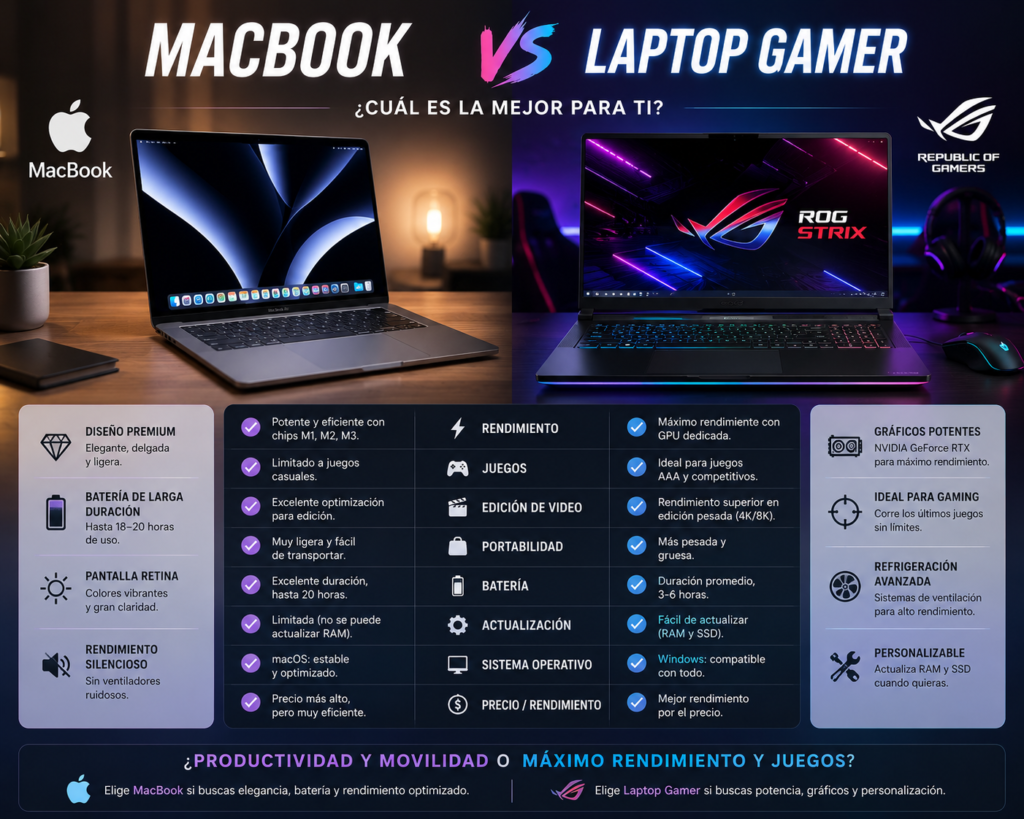
Choosing between a MacBook and a gaming laptop isn’t just about performance—it’s about how you plan to use your computer. While both are powerful, they are designed for different types of users. This guide compares battery life, gaming, productivity, portability, content creation, and value to help you decide.
| Feature | MacBook | Gaming Laptop |
|---|---|---|
| Battery Life | ⭐⭐⭐⭐⭐ | ⭐⭐☆☆☆ |
| Gaming | ⭐⭐☆☆☆ | ⭐⭐⭐⭐⭐ |
| Portability | ⭐⭐⭐⭐⭐ | ⭐⭐⭐☆☆ |
| Video Editing | ⭐⭐⭐⭐⭐ | ⭐⭐⭐⭐⭐ |
| 3D Rendering | ⭐⭐⭐⭐☆ | ⭐⭐⭐⭐⭐ |
| Software Compatibility | ⭐⭐⭐⭐☆ | ⭐⭐⭐⭐⭐ |
| Upgradability | ⭐☆☆☆☆ | ⭐⭐⭐☆☆ |
| Fan Noise | ⭐⭐⭐⭐⭐ | ⭐⭐☆☆☆ |
| Price-to-Performance | ⭐⭐⭐⭐☆ | ⭐⭐⭐⭐⭐ |
Apple’s MacBooks with Apple Silicon (M-series chips) are among the most power-efficient laptops available. Many models can last well over a full workday on a single charge, making them ideal for students, travelers, and professionals.
Best for:
MacBooks are widely used by:
Applications like Final Cut Pro and Logic Pro are optimized for macOS, and Apple Silicon performs exceptionally well in many creative workflows.
MacBooks are:
If you’re constantly moving between classes, offices, or coffee shops, portability is a major advantage.
A MacBook integrates seamlessly with:
Features like AirDrop, Handoff, Universal Clipboard, and iCloud synchronization create a smooth ecosystem experience.
If you enjoy playing modern AAA titles such as:
a Windows gaming laptop with a dedicated NVIDIA GeForce RTX or AMD Radeon GPU is the better choice. While macOS gaming has improved, Windows still supports a much broader game library and typically delivers higher frame rates.
Gaming laptops include dedicated GPUs that accelerate:
These tasks often benefit from the additional graphics horsepower.
Many professional applications are available only on Windows or offer their best compatibility there, especially in engineering, enterprise IT, and specialized business environments.
Examples include:
Many gaming laptops allow upgrades to:
MacBooks, by contrast, generally have memory and storage soldered to the motherboard, so you should choose your configuration carefully at purchase.
Both platforms are excellent for:
Winner: Tie
MacBooks perform exceptionally well thanks to Apple’s hardware-accelerated media engines, while high-end gaming laptops with dedicated GPUs also excel in demanding editing and rendering tasks.
Winner: Tie
Gaming laptops remain the clear choice because they offer:
Winner: Gaming Laptop
A typical MacBook can provide significantly longer battery life than most gaming laptops, which often prioritize maximum performance over endurance.
Winner: MacBook
MacBooks are generally quieter and run cooler during everyday workloads. Gaming laptops often require larger cooling systems and louder fans when under heavy load.
Winner: MacBook
There isn’t a universal winner because these laptops are built with different priorities.
A MacBook is the better choice if you value long battery life, quiet operation, premium build quality, portability, and a seamless experience for productivity and creative work. Apple Silicon has also made MacBooks remarkably efficient without sacrificing performance.
A gaming laptop is the better option if your main focus is gaming, GPU-intensive applications, Windows compatibility, or hardware flexibility. With dedicated graphics and a larger software ecosystem for games, gaming laptops remain the strongest choice for users who demand maximum graphics performance.
Bottom line: