Descripción

1. Display: 15.3-inch OLED Screen
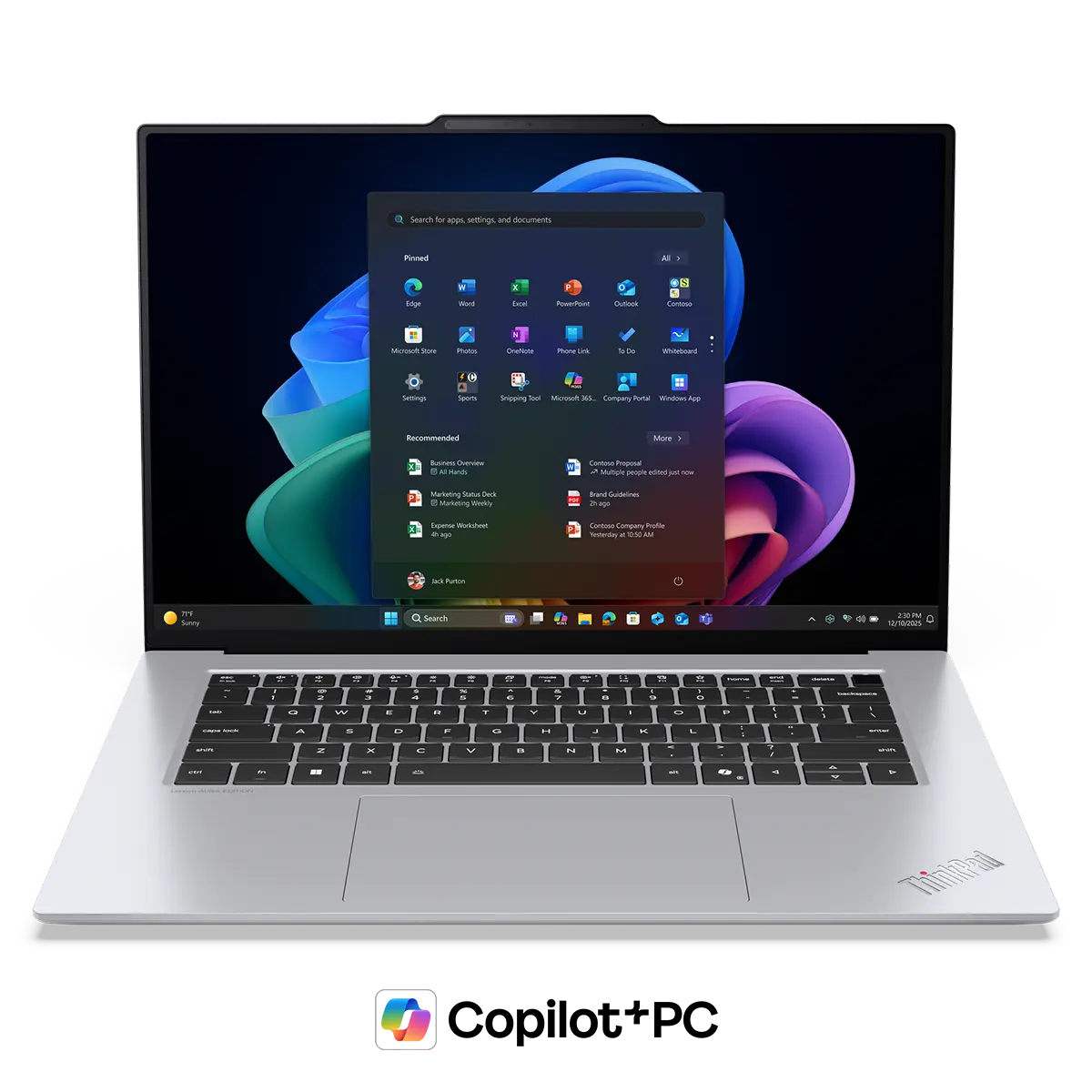
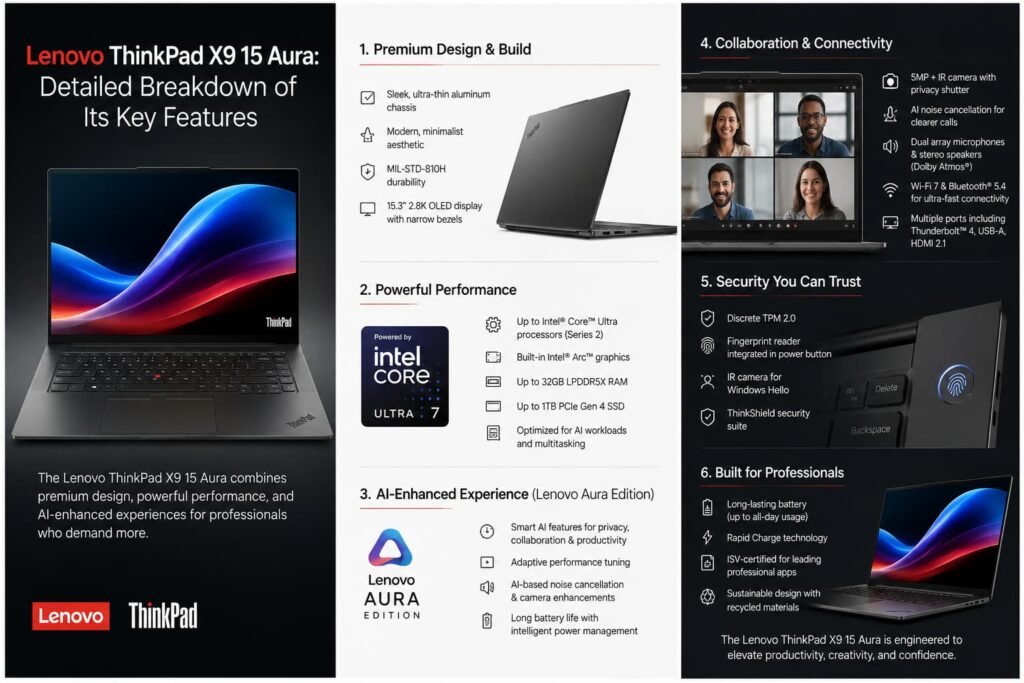
The Lenovo ThinkPad X9 15 Aura features a 15.3-inch OLED display, one of its most impressive components.
What makes OLED special?
Unlike traditional LCD panels, OLED technology allows each pixel to emit its own light. This means:
- True blacks: Black pixels are completely turned off.
- Exceptional contrast: Bright whites and deep blacks create a more realistic image.
- Vibrant colors: Images appear richer and more lifelike.
- Wide viewing angles: Colors remain accurate from different perspectives.
Benefits
- Excellent for watching movies and streaming content.
- Ideal for photo and video editing.
- Improved visual comfort during long work sessions.
- Premium viewing experience for productivity and entertainment.
2. Processor: Intel Core Ultra
The laptop is powered by Intel’s latest Core Ultra processors, designed for modern productivity and AI-enhanced computing.
Key Features
- Multiple performance and efficiency cores.
- Integrated AI acceleration through the Neural Processing Unit (NPU).
- Improved multitasking capabilities.
- Better energy efficiency than previous generations.
Benefits
- Faster application performance.
- Smooth multitasking with multiple programs open.
- Enhanced support for AI-powered tools.
- Longer battery life through intelligent power management.
Suitable For
- Business professionals.
- Developers.
- Content creators.
- Remote workers.
3. Memory: Up to 32 GB RAM
RAM (Random Access Memory) allows the computer to handle multiple tasks simultaneously.
What 32 GB Means
With up to 32 GB of RAM, users can:
- Run numerous applications at once.
- Work with large spreadsheets.
- Handle complex browser sessions with many tabs.
- Edit large images and videos more efficiently.
Benefits
- Faster multitasking.
- Reduced lag when switching between applications.
- Better overall system responsiveness.
For most users, 16 GB is already excellent, while 32 GB offers extra room for demanding workloads.
4. Storage: High-Speed NVMe SSD
The ThinkPad X9 Aura uses NVMe SSD storage, which is significantly faster than traditional hard drives.
Advantages of NVMe SSDs
- Rapid boot times.
- Fast file transfers.
- Quick application launches.
- Improved system responsiveness.
Practical Examples
- Windows starts in seconds.
- Large files open almost instantly.
- Software installations complete faster.
- Reduced waiting times during daily tasks.
The SSD contributes heavily to the laptop’s smooth and premium feel.
5. Graphics: Intel Arc Integrated Graphics
Instead of a dedicated graphics card, the ThinkPad X9 Aura relies on Intel Arc integrated graphics.
What It Can Handle
- Office applications.
- Video streaming.
- Graphic design projects.
- Photo editing.
- Light video editing.
- Casual gaming.
Limitations
While Intel Arc integrated graphics are much stronger than previous Intel integrated solutions, they are not designed for:
- High-end AAA gaming at maximum settings.
- Professional 3D rendering.
- Advanced visual effects production.
Benefits
- Lower power consumption.
- Less heat generation.
- Improved battery life.
6. Battery Life
One of the strongest aspects of the ThinkPad X9 Aura is its battery efficiency.
Factors Contributing to Battery Life
- Intel Core Ultra efficiency cores.
- OLED display optimization.
- Intelligent power management software.
- Efficient hardware integration.
.
| Component | Weight | Detailed Description |
|---|---|---|
| Build Quality | 14.0% | Assesses the durability and construction of the laptop, including chassis strength, material quality (aluminum, magnesium, carbon fiber), hinge reliability, and resistance to daily wear and tear. Business laptops are expected to withstand years of intensive use. |
| Keyboard | 11.0% | Evaluates typing comfort, key travel, tactile feedback, layout design, backlighting, and overall typing experience. This is especially important for professionals who spend long hours writing reports, emails, or coding. |
| Ports | 11.0% | Measures the variety and usefulness of available connections, including USB-A, USB-C, Thunderbolt, HDMI, Ethernet, SD card readers, and audio jacks. A wide selection of ports improves productivity and compatibility with business accessories. |
| Geekbench 5 (Synthetic Performance) | 11.0% | Benchmarks the processor’s performance in both single-core and multi-core workloads. It indicates how efficiently the laptop can handle multitasking, office applications, data processing, and professional software. |
| Portability | 8.4% | Considers the laptop’s weight, thickness, and ease of transport. Lightweight and compact laptops receive higher scores because they are more convenient for travel and mobile work environments. |
| Webcam & Microphone | 8.3% | Evaluates video quality, microphone clarity, noise reduction capabilities, and conferencing performance. With remote work becoming standard, high-quality communication tools are increasingly important. |
| Touchpad | 7.3% | Measures precision, responsiveness, smoothness, gesture support, and overall usability. A reliable touchpad can significantly improve workflow when a mouse is unavailable. |
| Battery | 7.0% | Assesses real-world battery life, power efficiency, charging speed, and battery management features. Long battery life is essential for professionals who work away from power outlets. |
| Serviceability | 6.0% | Examines how easy it is to upgrade or replace components such as the SSD, battery, cooling system, or memory. Better serviceability can reduce maintenance costs and extend device lifespan. |
| Brightness | 6.0% | Measures display brightness in nits. Higher brightness levels improve visibility in bright offices, outdoor environments, and areas with strong ambient lighting. |
| Reflections | 6.0% | Evaluates how well the display minimizes glare and reflections. Anti-glare screens help reduce eye strain and improve readability in various lighting conditions. |
| Flicker (PWM) | 2.0% | Determines whether the display uses Pulse Width Modulation (PWM) for brightness control. Lower flicker levels are generally more comfortable for extended viewing sessions and reduce eye fatigue. |
| Thermals and Noise | 2.0% | Measures heat management and fan noise under load. Efficient cooling and quiet operation contribute to a more comfortable working environment. |

Valoraciones
No hay valoraciones aún.